

Overview
A Curobi curated box is a subscription box whose contents the merchant selects and rotates on a schedule the customer subscribes to the experience and the merchant decides what ships each cycle, such as a monthly coffee sampler that changes every month.

The recurring theme — coffee-of-the-month, a seasonal sampler — is what the customer is really buying, so rotation and a clear cutoff for assembling the shipment matter. Curated boxes are operationally simpler than build-your-own because the merchant controls the contents, and they showcase range.
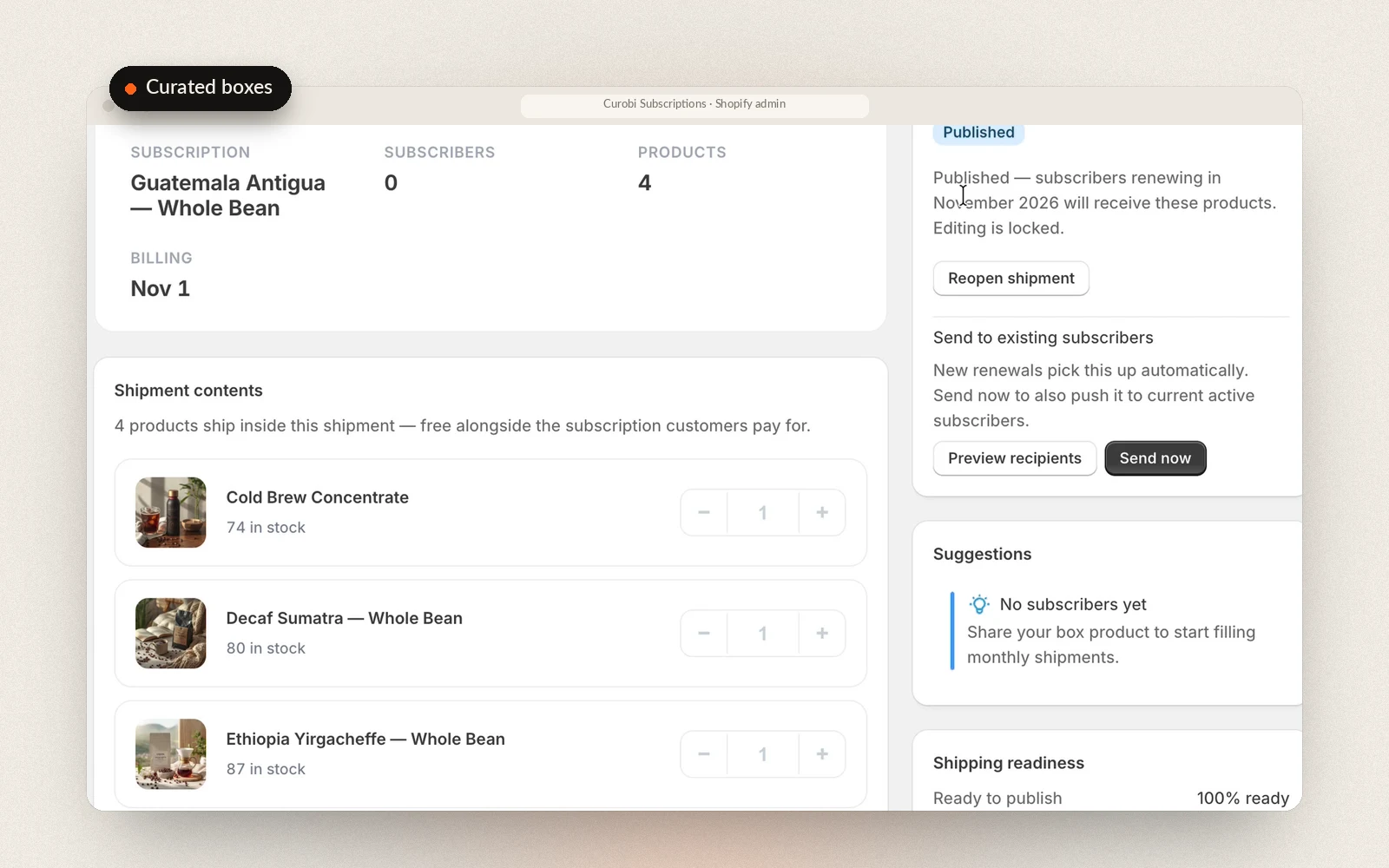
What makes Curobi different from a monthly-box workaround is the planning window. The box editor covers this month and the next three, so up to four months of boxes can be built at once, each month its own box with its own products and quantities. Before a renewal bills, Curobi rewrites that subscriber's contract to the contents of the month they are billing into, so a subscriber billing on July 15 gets the July box and rolls to August on their own. If you never got round to a month, subscribers keep receiving your latest published box rather than an empty order; a future month is never quietly filled with an old one. Publishing a month's shipment freezes its contents, and from then on nothing else is needed: the products are added to each subscription automatically before it bills. To update everyone straight away, Send now first shows who gets a box, who already has it and who is blocked, and because subscribers renew on their own dates, it names which month's box each group gets. Nothing changes until you confirm.
Once a shipment is published, the editor's packing list turns the month into a spreadsheet you can order and pack from: one line per product, with how many go in one box, the units needed for every subscriber due that box, your current Shopify stock, how many you're short by and the SKU. The box and month are on every line, so lists from two boxes paste into one sheet. When a product is short or running low, a stock card says how many you need, how many you have and about how many to reorder. The numbers are counted when you download, so download again close to pack day.
By default each subscriber renews on their own signup date, so boxes go out a few at a time all month. The box editor's Schedule section can put the box on a fixed calendar instead: everyone is charged on the same day, every month or only in the months you choose for a quarterly or seasonal box, with an order cutoff and an optional ship day, so you buy stock once, pack once and ship in one batch. The period picker then lists the next charge days with their ship dates, and a one-time box order gets the box for the season it joins.
Curobi ships merchant-curated boxes that rotate on a schedule on its $69.99 Pro plan — a price point where the established subscription apps are still charging $299–$499/month — part of why it fits box-first businesses like specialty coffee roasters.
What Curated Boxes gives you
- Curate this month and the next three in one sitting, up to four months of boxes
- Each month is its own box with its own products and quantities
- The right month's contents are applied to every subscriber's renewal before it bills
- A missed month keeps shipping your latest box, never an empty order
- Download a packing list: units of each product for the subscribers due, with stock and SKU
- A stock warning with reorder amounts, and a check of who gets which month's box before you send
- Optional fixed calendar: charge every subscriber on the same day and ship in one batch
- On the $69.99 Pro plan — where others charge $299–$499/month
- Runs on Shopify's native billing with 0% Curobi transaction fees
How to plan a curated subscription box months ahead in Curobi
Create the box product
Create the curated box plan and its box product with a name and price, without leaving the editor; it is published to your storefront.
Curate each month
Pick a month in the editor, this month or any of the next three, and add that month's products and quantities from your catalog.
Publish the month's shipment
When the contents are right, click Publish shipment. Publishing freezes that month's contents; click Reopen to edit if you need to change them.
Download the packing list
Click Download packing list for a spreadsheet of the units of each product the month needs, against your current Shopify stock, and order or pull stock from it.
Let the right month ship itself
Curobi adds each month's products to every subscriber's renewal before it bills. To update everyone now instead, click Send now, check who gets which month's box, then click Send to N subscribers.
Related terms: Curated Box, Subscription Box, Fixed-Calendar Billing.
Questions merchants ask
Can I plan subscription boxes months ahead in Curobi?
Yes. The box editor covers this month and the next three, so you can build up to four months of curated boxes in one sitting. Each month is its own box with its own products and quantities, and Curobi applies the right month's contents to every subscriber's renewal before it bills, so the box ships itself when its month arrives. If you skip curating a month, subscribers keep receiving your latest published box rather than an empty order, and a future month is never filled with an old box. Build-a-Box works the same way when you choose a rotating monthly menu, or you can keep one stable menu that never expires; subscribers still pick their own items for their next box before the cutoff. Mix & Match bundles draw from a live catalog of categories you define, so there is nothing to plan month by month.
What is a build-your-own subscription box?
A build-your-own box lets a customer assemble their own recurring box from a set of eligible products — for example, choosing which coffee bags go in this month's shipment. Curobi enforces per-item limits and a billing cutoff, so the box is locked in before the recurring charge is created. Merchants can also ship a curated box they assemble themselves that rotates on a schedule.
Can Curobi tell me how many of each product to pack for a box shipment?
Yes, for curated subscription boxes, which are on the Pro plan and in the Free plan's one-time 14-day trial. Once a month's shipment is published, the box editor has a Download packing list button. It gives you a spreadsheet (CSV) with one line per product: how many go in one box, the units needed for every subscriber due that month's box, your current Shopify stock, how many you're short by, and the SKU. The box name and month are on every line, so lists from two boxes fit in one sheet. The numbers are counted when you download, and sign-ups, skips, pauses and failed payments after that change the final count, so download it again close to pack day. When a product is short or running low, the editor also shows how many you need, how many you have and about how many to reorder. Build-a-Box and one-time box sales don't have a packing list; use your Shopify orders for those.