

Videos2:31
One charge day for every subscriber
Charge every subscriber on the same day, whenever they joined. This walkthrough shows how to set a fixed billing date for Shopify subscriptions and subscription boxes with Fixed calendar, new in Curobi. Rolling billing charges each customer on the day they signed up, so a monthly box ends up with charges spread across the whole month. Fixed calendar puts everyone on one charge day and one ship day, so you buy, pack and ship in one batch.
Key moments
- 0:00Why every subscriber should share one charge day
- 0:18Rolling billing vs Fixed calendar billing
- 0:35Switch a subscription plan to Fixed calendar
- 0:45Set the charge day and ship day
- 0:56Charge only in chosen months (seasonal and quarterly boxes)
- 1:15Order cutoff and a new subscriber's first box
- 1:31Check the checkout preview and next charge dates
- 1:52Fixed calendar for Curated Boxes and Build-a-Box
- 2:07Skips and reschedules stay on the calendar
Go deeper
Plans. Fixed calendar is part of Curobi Pro. Shopify processes every recurring charge, and there are no Curobi transaction fees on any plan. Compare plans.
Questions this video answers
- How do I charge all my Shopify subscribers on the same day?
- Open the subscription plan in Curobi, go to Schedule and switch the billing calendar from Rolling to Fixed calendar. Pick a charge day from 1 to 28 and, if you need packing time, a ship day.
- What is the difference between rolling and fixed calendar billing?
- Rolling billing counts from the day each customer signed up. Fixed calendar charges every subscriber on the same dates each month or season.
- Can I bill a subscription box only in certain months?
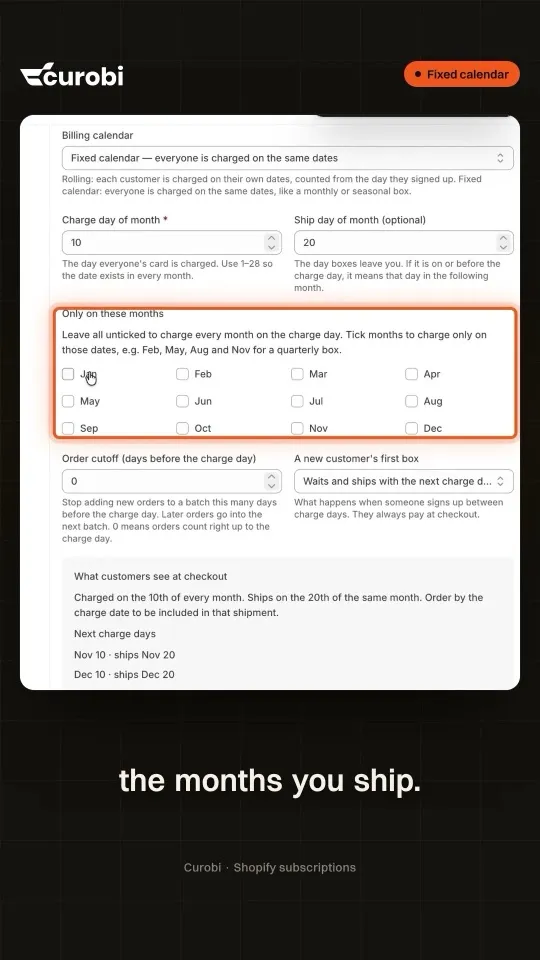
- Yes. Tick only the months you charge, for example Jan, Jun, Jul, Nov and Dec for five drops a year.
- What happens when someone subscribes between charge days?
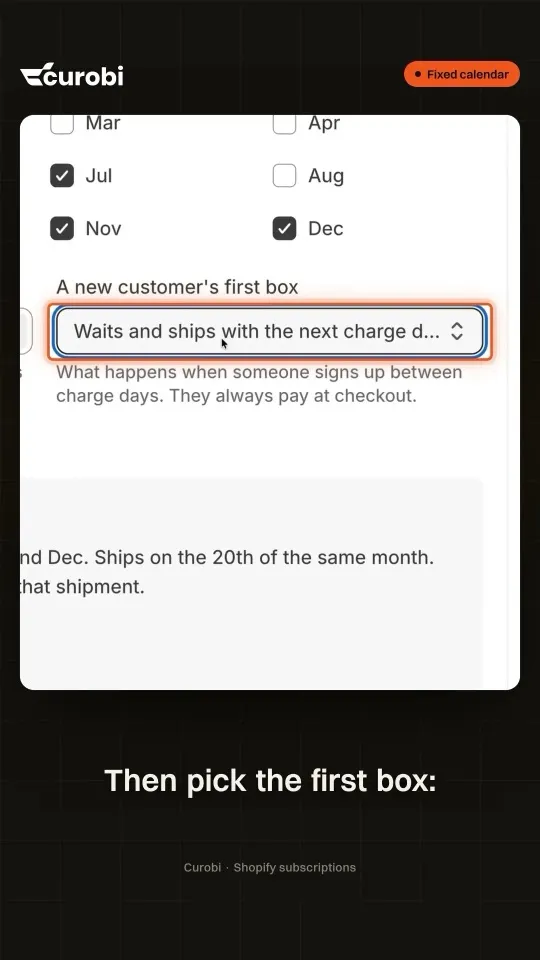
- You choose: their first box waits for the next batch, or ships right away and then joins the calendar. Either way they pay at checkout.
- What happens when a subscriber skips or reschedules?
- A skip moves to the next charge date, and a reschedule snaps to one, so nobody drifts off the calendar.
Shorts from this video
Under a minute each, on one part of the video.
Every 4 Weeks Is Not a Month: Subscription Billing Explained
Billing every 28 days means 13 charges a year and a charge day that keeps slipping. Curobi's fixed calendar charges on the same date every month. Fixed calendar is an option on Curobi Pro.
Seasonal Subscription Box? Charge Only the Months You Ship | Shopify Subscriptions
Selling a seasonal or quarterly box? You don't have to charge every month. In Curobi's Fixed calendar, open the plan's Schedule and tick only the months you ship. The checkout line updates as you tick, so customers see exactly which months they are charged, and nobody is charged in between.
New Subscriber Between Charge Days? Here's What Happens | Shopify Subscriptions
Everyone pays on the 10th, and someone subscribes on the 23rd. In Curobi's Fixed calendar you decide what happens: set an order cutoff so late orders roll into the next batch, then choose the first box. It waits for the next batch, or it ships right away and joins the calendar after. Either way, they pay at checkout.

More videos
All videos 2:22Sell a box on subscription when Shopify's bundles can'tShopify Bundle Subscriptions 2026: Sell the Box Shopify Says You Can't
 2:20Five settings that cut subscription box cancellations5 Ways to Cut Subscription Box Cancellations on Shopify (No Developer)
 2:37Four decisions to make before you launch a subscription boxHow to Start a Subscription Box Business in 2026 (4 Crucial Steps)
 2:45One month of a subscription box business, lived twiceHow to Run a Subscription Box Business on Shopify 2026 (Without the Manual Work)
Try it on your own store.
Install free, create one plan, and see it on your own product page. Free up to 50 active subscriptions, 0% transaction fees on every plan.