
Can you sell a bundle on subscription in Shopify? Where Shopify stops, and what works
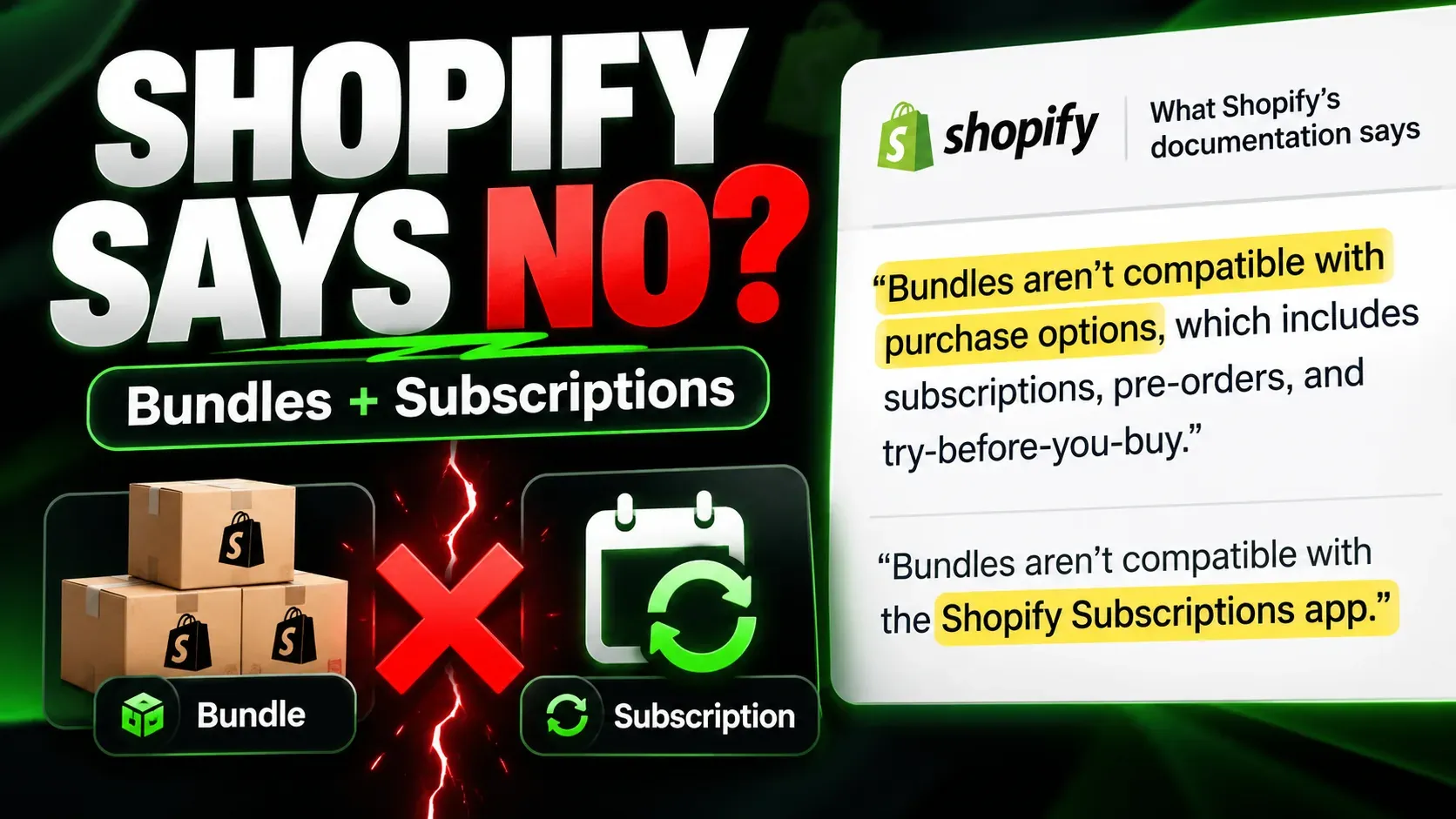
You can’t sell a bundle made with Shopify’s own bundle tools on subscription. Shopify’s developer documentation states that “Bundles can’t be sold with selling plans, such as subscriptions, pre-orders, and try-before-you-buy,” and its Help Center says bundles aren’t compatible with the Shopify Subscriptions app. What does work is a bundle built from ordinary products that can carry a subscription: either one product that stands in for the whole set, or a subscription app that assembles the bundle itself.
This post sets out where Shopify’s support stops, checked against Shopify’s documentation on 28 October 2026; what you can do with Shopify alone; what to ask any subscription app before you launch; and two worked setups in Curobi, a refill kit that ships the same items every month and an “any 6 teas, save 15%” bundle on repeat, down to what lands on the order and what renews.
Quick answer: can you sell a bundle as a subscription on Shopify?
- Shopify Bundles app: makes fixed bundles and multipacks. Neither can be sold on subscription.
- Shopify Subscriptions app: can’t sell a bundle. It can sell a single ordinary product that you treat as a kit.
- Mix-and-match bundles built through Shopify’s bundle APIs: the same rule applies. Shopify’s Cart Transform function, which assembles them in the cart, rejects its bundle operations when a selling plan is present.
- Subscription apps: can sell a bundle on subscription by building it from ordinary products. How they build it decides what your orders, stock counts, warehouse and renewals look like, so that is the question to ask.
In Curobi, a fixed bundle is a curated box with its items chosen once (Pro plan), and a pick-your-own bundle with quantity breaks is Mix & Match (Business plan). Bundles made in Shopify’s Bundles app can’t be put on subscription in Curobi either.
Which Shopify tools can sell a bundle on subscription? (October 2026)
Shopify sells subscriptions through a selling plan: the object that says “deliver every month at this price” and that becomes a subscription contract at checkout. Every Shopify tool that makes bundles runs into the same rule, which is that a Shopify bundle can’t carry a selling plan.
| Shopify tool | What it does with bundles | On subscription? | What Shopify’s documentation says |
|---|---|---|---|
| Shopify Bundles app (free) | Fixed bundles and multipacks; it “doesn’t support mix-and-match bundles” | No | “Bundles aren’t compatible with purchase options, which includes subscriptions, pre-orders, and try-before-you-buy.” |
| Shopify Subscriptions app (free) | Subscribe & Save on ordinary products | Not for bundles | “Bundles aren’t compatible with the Shopify Subscriptions app.” |
| Bundle APIs for apps: fixed and customized bundles | Fixed bundles are “Shopify’s default implementation”; customized bundles cover “more choices to customers… such as Mix-and-match bundles” | No | “Bundles can’t be sold with selling plans, such as subscriptions, pre-orders, and try-before-you-buy.” |
| Cart Transform Function API (assembles customized bundles in the cart) | Expands, merges or updates cart lines into a bundle | No | Lists “Subscription (Recurring Orders)” as not supported; “Shopify rejects lineExpand, linesMerge, and lineUpdate operations if a selling plan is present.” |
The first two rows come from Shopify’s Help Center (bundle eligibility and considerations and Shopify Subscriptions considerations); the last two from its developer documentation (About product bundles and the Cart Transform Function API). Shopify’s Help Center adds that mix-and-match bundles need a third-party bundle app or, on Shopify Plus, the Bundles APIs. A mix-and-match bundle built on Shopify’s bundle APIs, by an app or on Plus, is still a Shopify bundle, so the same rule applies to it.
Is Shopify going to add bundle subscriptions?
Possibly, but nothing is scheduled. In a November to December 2025 thread on Shopify’s developer community forum, a Shopify account (Donal-Shopify) reported that the Admin API will accept a selling plan on a bundle but adding that bundle to the cart fails, called bundles working with selling plans the most-requested bundles feature, and said the work was in development with a tentative target of early 2026 and no firm date. As of 28 October 2026, Shopify’s bundle documentation still says bundles can’t be sold with selling plans, and Shopify’s developer changelog has no entry that adds it. Plan around today’s rule, and recheck the bundles page before you rebuild anything.
Why can’t a Shopify bundle carry a subscription?
A Shopify bundle is a parent product whose components Shopify manages for you: at checkout the components appear as a group of lines, and on the order they come back “with a reference to the bundle parent,” in the words of Shopify’s bundle documentation. A subscription is a selling plan attached to a cart line. Shopify doesn’t let one line be both, so every bundle subscription that works on Shopify today is built from ordinary products, and the bundle exists in how those products are arranged on the order.
There are three arrangements, and each one sets what your stock counts, warehouse and reports see.
| How the bundle sits on the order | Each item’s stock goes down? | What the warehouse sees | What sales reports show | Usual price model |
|---|---|---|---|---|
| One priced line, with the contents written as text on it (line item properties) | No, only the line’s own product | One SKU, plus a note it has to read | One product sold | One bundle price |
| One priced line, plus each item as its own line at $0 | Yes | Every SKU | The bundle as the revenue line, items at $0 | One bundle price |
| Every item as its own priced line, plus a discount | Yes | Every SKU | Each item at the price it actually sold for | Sum of the items, less a discount |
None of the three is wrong. The first is simplest and leaves your stock counts blind to what is inside the bundle. The second keeps one price on the subscription and still moves real SKUs. The third makes every item visible in revenue, at the cost of a discount that has to be right on every renewal. Know which one you want before you pick a tool.
What can you do with Shopify alone?
Route 1: one product that stands in for the kit
Create an ordinary product, say a “Pour-over refill kit” with its own SKU, and put it on a subscription plan in the Shopify Subscriptions app. This works because the kit is not a Shopify bundle; it is just a product. The limits follow from that. Shopify counts stock on the kit, not on the bags and filters inside it. The warehouse sees one SKU and has to know what goes in it. Changing the contents changes them for every subscriber at once, or means a new product and moving subscribers onto it. And your sales reports say “kit,” never what was in it.
This route is genuinely enough when the contents never change, you pre-pack the kit, and your warehouse already stocks it as its own SKU. If that is your business, you may not need an app for the bundle at all.
Route 2: separate products plus a quantity discount
Put each product on a subscription plan and add an automatic discount, such as 15% off when a cart holds six or more items from a tea collection, applied to subscription purchases. Shopify’s Help Center confirms that automatic discounts made in the Discounts section “can be applied to subscription orders.” What you don’t get is a bundle: the shopper adds each tea separately from its own product page, nothing tells them how many more items unlock the saving, and nothing enforces a pick of six. You also need to check how many billing cycles the discount covers, so the saving doesn’t quietly stop after the first order; Shopify’s Help Center describes a Recurring payments for subscriptions setting as the way to limit that.
What should you ask a subscription app before launching a bundle subscription?
Whichever app you use, these answers decide how the bundle behaves after the first order.
- Which product carries the subscription? If the answer is a bundle made in Shopify’s Bundles app, stop there: Shopify doesn’t allow it.
- What lands on the order? One priced line on its own leaves the items’ stock uncounted. One priced line plus each item at $0 moves every item’s stock and shows the warehouse every SKU. Every item as its own priced line does the same, and also shows each item’s selling price in your sales reports.
- Does each item’s stock go down, on the first order and on every renewal? The first order is created at checkout and renewals are created from the subscription, so a design can get one right and miss the other.
- How many billing cycles does the bundle discount cover? For discounts that apps
create, Shopify’s default is one: its API reference documents a
recurringCycleLimitthat defaults to 1, and “if you specify0, then the discount applies indefinitely” (DiscountAutomaticAppInput). Ask which value the app sets. If the offer includes a shipping discount made by a discount Function, Shopify’s documentation adds that recurring orders get a 100% shipping discount “regardless of the original discount value.” - What happens to the price when a subscriber changes the bundle? Shopify states that a discount Function “isn’t re-run when the recurring orders are created” (Discount Function API), so renewals use what the app saved to the subscription. Ask how the app updates it after a change.
- What can the subscriber change from the customer portal? Swap an item, change a quantity, re-pick the whole box, or nothing but skip and pause.
How does Curobi sell a bundle on subscription?
Curobi builds its bundles from ordinary products, never from Shopify bundles, so each one can carry a subscription. A curated box and a build-a-box keep one priced box line and add each item as a $0 line. Mix & Match puts every picked item on the order as its own priced line and applies a quantity break at checkout. All of them can be sold on subscription or as a one-time purchase. The two examples below are illustrations with made-up products and prices, not customer data. To see both formats in the app, watch the box demo on YouTube: the curated box starts at 0:31 and Mix & Match at 1:06.
Example 1: a refill kit that ships the same items every month (curated box)
Example. A coffee roaster sells a Pour-over Refill Kit for $38 a month: two 250 g bags of its house blend and one pack of 100 paper filters. In Curobi that is a curated box with its items chosen once.
- Create the curated box, and create its box product without leaving the editor: name it “Pour-over Refill Kit,” price it at $38, and it is published to your storefront.
- Add the items and quantities from your catalog: House Blend 250 g × 2, Paper filters (100) × 1.
- Offer it on a monthly subscription, and as a one-time purchase if you want both.
- Publish the box. Curobi keeps applying your latest published box to every renewal, so a fixed kit is simply a curated box you never re-curate.
| Stage | What it carries |
|---|---|
| Checkout | One line: Pour-over Refill Kit, $38.00, on the monthly subscription |
| First order, just after checkout | The kit line at $38.00, plus House Blend 250 g × 2 and Paper filters × 1, each added by Curobi with a 100% line discount so it costs $0.00. Each item’s stock goes down and the warehouse sees the real SKUs |
| The subscription contract | The kit line at $38.00, with the two items as $0.00 lines |
| Each renewal | Curobi asks Shopify to bill the subscription, and the renewal order carries the kit at $38.00 and both items at $0.00 |
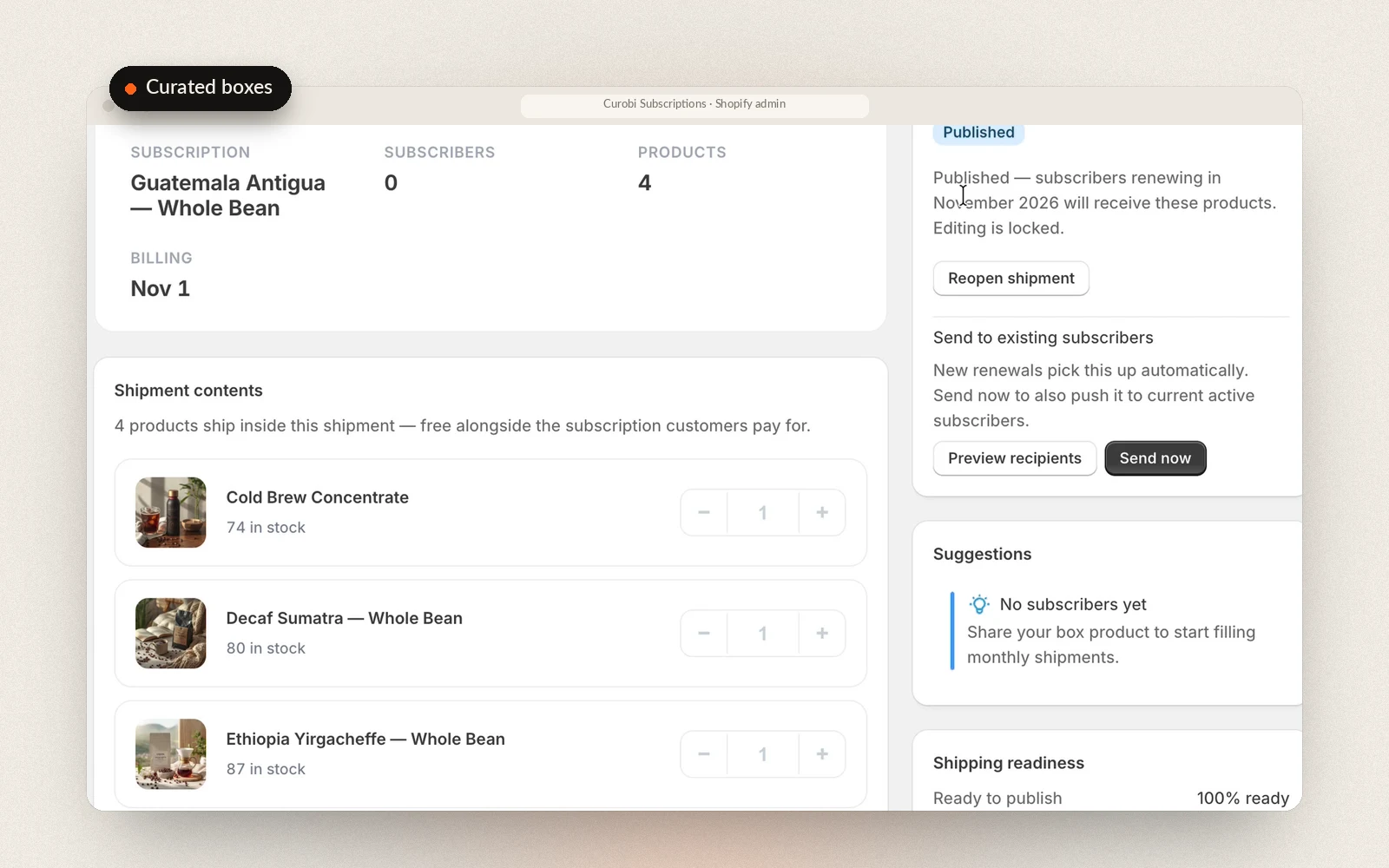
The curated box editor. The products listed under shipment contents ride along at $0 next to the box line the subscriber pays for.
If you change the kit later, say a new blend in March, edit the box, or curate March as its own box: the editor covers this month and the next three. Before each subscriber’s next renewal bills, Curobi rewrites their subscription to the new contents, and the $38 line stays as it is. A readiness check and a dry-run preview show who will receive what before you send, and an inventory forecast compares the units you need with your live Shopify stock. If you would rather pack every kit on one day, Pro can also charge every subscriber on the same date with a fixed-calendar schedule.
One limit to know: a curated box is your set, so its contents are read-only in the customer portal. Subscribers can skip, pause or cancel, but they can’t swap the filters for a third bag. If subscribers should choose, use Mix & Match or build-a-box instead. The full feature is on the curated boxes page.
Example 2: “any 6 teas, save 15%” on repeat (Mix & Match)
Example. A tea shop sells loose-leaf tins at $8 each and wants a pick-your-own bundle that renews monthly. In Curobi that is a Mix & Match bundle.
- Create categories with your own names, such as Green, Black and Herbal, and add products to each.
- Set a minimum of 3 items and two volume discounts: 3 or more items, 5% off; 6 or more items, 15% off.
- Sell it on a monthly subscription and as a one-time purchase.
- Add the Mix & Match block to the bundle’s product page.
The shopper picks Sencha × 2, Earl Grey × 2, Chamomile × 1 and Rooibos × 1. As they add items, the widget shows the tier they have reached and how many more items unlock the next one. At checkout, the order looks like this:
| Line | Qty | Price | 15% off | Line total |
|---|---|---|---|---|
| Sencha | 2 | $16.00 | −$2.40 | $13.60 |
| Earl Grey | 2 | $16.00 | −$2.40 | $13.60 |
| Chamomile | 1 | $8.00 | −$1.20 | $6.80 |
| Rooibos | 1 | $8.00 | −$1.20 | $6.80 |
| Total | 6 | $48.00 | −$7.20 | $40.80 |
Each pick is its own cart line on the same monthly selling plan, tagged as part of the bundle. At checkout, Curobi’s discount (a Shopify discount Function) finds the bundle’s lines, counts the items actually in the cart, and applies the highest tier reached to each line, so a cart can’t claim a tier it hasn’t earned. Shopify rounds a percentage discount line by line, and the widget calculates its preview the same way, so the total the shopper sees is the total the checkout charges.
On renewal, Shopify doesn’t re-run the discount Function; what carries forward is the discount applied at checkout, for as many billing cycles as that discount allows. Shopify’s default for app discounts is one cycle. Curobi creates its Mix & Match discount with the limit at 0, which Shopify documents as applying indefinitely, so the quantity break isn’t limited to the first order. The renewal order is built from the subscription’s lines: the same four teas, six tins.
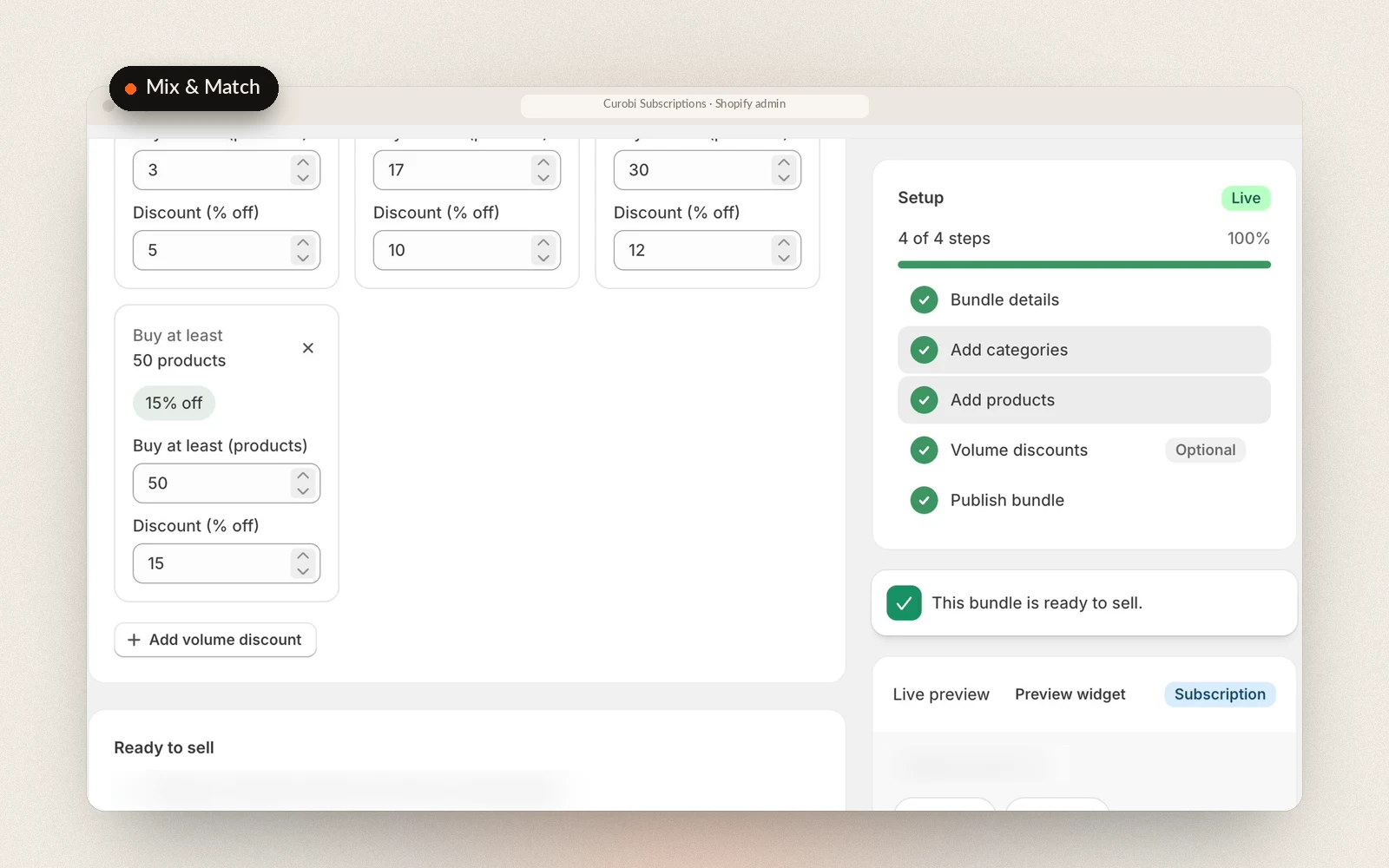
The Mix & Match editor. Each volume discount is a minimum item count and a percentage off.
Because every tea is a real line, your reports show that Sencha and Earl Grey sold and at what price, rather than one bundle SKU with $0 contents, and a subscriber can swap one tea for another from the customer portal if you allow swaps. Mix & Match has no monthly menu to plan: it draws from a live catalog of the categories you define. Volume discounts are percentages off by item count.
When the customer should re-pick every cycle: build-a-box
If the box should hold one price while the subscriber chooses its contents again each cycle, that is a build-a-box: a menu you set, a minimum and maximum pick, and a cutoff after which the selection locks before the charge. It uses the same one-priced-line-plus-$0-items arrangement as the curated box. The decisions behind it, and what ships when a subscriber never picks, are covered in build-your-own-box subscriptions on Shopify.
What Curobi doesn’t do with bundles
- Bundles made in Shopify’s Bundles app can’t be sold on subscription through Curobi. Shopify blocks the selling plan on them. To sell the same set on subscription, rebuild it as a curated box (fixed contents) or a Mix & Match bundle (customer-chosen).
- Curated box contents are read-only in the customer portal. Subscribers can’t swap items inside a curated box.
- Mix & Match isn’t planned by month. Curating this month and the next three applies to curated boxes and to build-a-box on a rotating monthly menu, not to Mix & Match.
Which Curobi plan you need, and what it costs
Mix & Match is on the Business plan, at $29.99 every 30 days. Curated boxes, including a fixed kit with its items chosen once, and build-a-box are on Pro, at $69.99 every 30 days, which also includes Mix & Match. The one-time 14-day trial on the Free plan includes Curated Boxes; when it ends, a box program pauses until you move to Pro. On a Shopify development store every Curobi feature is free, so you can build the bundle and place test orders before choosing a plan. Every plan charges 0% Curobi transaction fees, which matters more for bundles than for single products, because a bundle order is usually larger and a percentage fee is taken from all of it, every cycle. Shopify’s own payment processing fees still apply. See how Curobi’s bundles and Mix & Match work or compare the plans.
Which bundle format fits your product?
| Format | Who picks | Price | What the order shows | Changes after signup | Where |
|---|---|---|---|---|---|
| One kit product | You, once | One price | One SKU | You change the product for everyone | Shopify Subscriptions, free |
| Fixed kit (curated box, items chosen once) | You | One box price | Box line, plus each item at $0 | You edit the box; renewals follow | Curobi Pro |
| Mix & Match | The customer, at signup | Sum of items, less a quantity break | Each item, priced | Subscriber swaps items in the portal | Curobi Business |
| Build-a-box | The customer, every cycle | One box price | Box line, plus each item at $0 | Subscriber re-picks before the cutoff | Curobi Pro |
- Sell one kit product when the contents never change, you pre-pack the kit, and your warehouse already stocks it as its own SKU.
- Use a fixed kit when the set is yours to define, such as a refill kit, a routine or a starter set, and you want each item’s stock and SKU on every order, or you expect to change the kit a few times a year without moving subscribers.
- Use Mix & Match when the goal is a bigger order from customers who know what they like: consumables that come in several flavours, varieties or scents.
- Use build-a-box when one box price has to hold and customers want to choose again each cycle.
- Think twice about a deep quantity break on subscription when your margin only works at the first-order price. The discount repeats on every renewal, so price the top tier for the life of the subscription, not for the first box.
For the merchant-chosen versus customer-chosen side of this decision, the guide build-your-own vs curated box goes further, and the product bundle and subscription box glossary entries define each term. If bundles are why you are outgrowing Shopify’s free app, Shopify Subscriptions vs a subscription app covers the other limits to check.
Frequently asked questions
Can I sell a Shopify Bundles app bundle on subscription?
No. Shopify’s Help Center says bundles aren’t compatible with purchase options, which includes subscriptions, pre-orders and try-before-you-buy, and its developer documentation says bundles can’t be sold with selling plans. That covers bundles made in the free Shopify Bundles app and bundles other apps build through Shopify’s bundle APIs, and no subscription app can get around it, Curobi included. To sell the same set on subscription, build it from ordinary products instead: one product that stands in for the whole kit, or a subscription app’s own bundle, such as a Curobi curated box with its items chosen once.
Does the Shopify Subscriptions app support bundles?
No. Shopify states that bundles aren’t compatible with the Shopify Subscriptions app. The app can sell any single ordinary product on subscription, so you can create one product that represents your kit and subscribe customers to it. Shopify then counts stock on that kit product rather than on the items inside it, the order shows one line, and changing the contents changes them for every subscriber at once. For item-level stock, a bundle the customer chooses, or a quantity break that repeats on every renewal, you need a subscription app that builds its own bundles.
Does a bundle discount apply to every renewal, or only the first order?
It depends on how the discount was set up, so check it before launch. Shopify’s Help Center describes a Recurring payments for subscriptions setting that limits how many billing cycles a discount covers. For discounts created by apps, Shopify’s default is one billing cycle unless the app sets the limit to 0, which Shopify documents as applying indefinitely, and Shopify doesn’t re-run a discount Function when it creates recurring orders. Curobi creates its Mix & Match discount with the limit at 0. A Curobi curated box has no discount to expire: the subscriber pays the box price, and the items ride along at $0.
How does inventory work when a bundle is sold on subscription?
It depends on what lands on the order. If one product stands in for the whole kit, stock goes down on that product only, so the items inside it have to be tracked somewhere else. If the bundle is one priced line plus each item as a $0 line, each item’s stock goes down and the warehouse sees every SKU; that is how Curobi’s curated boxes and build-a-box work, on the first order and on every renewal. If every item is its own priced line, as in Curobi’s Mix & Match, each item’s stock goes down and your sales reports show what each item sold for.
Can subscribers change what’s in their bundle?
In Curobi it depends on the format. A curated box is the merchant’s set, so its contents are read-only in the customer portal; subscribers can still skip, pause or cancel. In a Mix & Match bundle each item is its own line, so a subscriber can swap one product for another from the portal if you allow swaps. In a build-a-box subscription the subscriber picks again each cycle, before the cutoff you set. If subscribers keep asking to change a fixed kit, that is usually a sign it should be a Mix & Match bundle or a build-a-box instead.
Which Curobi plan do I need to sell bundles on subscription?
Mix & Match bundles are on the Business plan, at $29.99 every 30 days. Curated boxes, including a fixed kit with its items chosen once, and build-a-box are on Pro, at $69.99 every 30 days, which also includes Mix & Match. Every plan charges 0% Curobi transaction fees; Shopify’s own payment processing fees still apply. Bundles made in Shopify’s Bundles app can’t be sold on subscription on any plan, because Shopify doesn’t allow selling plans on them.
Sources
- Shopify Help Center — Eligibility and considerations for using product bundles (bundle types; bundles not compatible with purchase options or the Shopify Subscriptions app; the Shopify Bundles app doesn’t support mix-and-match), Shopify Subscriptions app eligibility considerations (bundles not compatible; automatic discounts can apply to subscription orders), Subscription discounts (the Recurring payments for subscriptions setting)
- Shopify.dev — About product bundles (fixed vs customized bundles; “Bundles can’t be sold with selling plans”; how bundle components appear on orders), Cart Transform Function API (subscriptions not supported; bundle operations rejected when a selling plan is present), Discount Function API (not re-run on recurring orders; shipping discounts on recurring orders), DiscountAutomaticAppInput (
recurringCycleLimit, default 1; 0 applies indefinitely), developer changelog (no entry adding selling plans to bundles, October 2024 to 27 October 2026) - Shopify developer community — sellingPlanGroupCreate mutation work with variantBundles? (replies from the Donal-Shopify account, 17 November to 9 December 2025)
- Curobi — box demo video (curated box from 0:31, Mix & Match from 1:06)
Shopify’s bundle and subscription documentation changes. Every Shopify claim above was checked against the linked pages on 28 October 2026; recheck them before you rebuild a bundle around them.